

Artificial intelligence is quietly becoming the operating layer of modern computing.
From laptops to smartphones, AI assistants are beginning to take center stage in how we search, write, communicate, and work. Instead of interacting directly with software, users are increasingly interacting with AI systems that coordinate multiple applications and services behind the scenes.

Microsoft Copilot is one of the most ambitious attempts to build this new AI-driven computing environment.
What started as an experimental assistant inside Microsoft Office has evolved into a system-level intelligence layer integrated across Windows, smartphones, tablets, and cloud infrastructure. In 2026, Copilot is no longer just a chatbot or sidebar tool. It functions as the connective intelligence linking devices, applications, and personal data into a unified digital workspace.
For professionals, creators, entrepreneurs, and students across Africa, understanding this shift matters. It signals a transition to a new generation of computing in which AI becomes the interface between humans and technology.
This Tech Decoded guide explains how Microsoft Copilot works, the hardware that powers it, and what users should look for when choosing devices for the AI-first era.
Read the AI & Emerging Technology Master Guide
Tech Decoded Summary
| Topic | Key Insight |
| AI Workspace | Copilot connects PCs, smartphones, and cloud services into a shared intelligence layer. |
| AI PC Standard | Devices require at least 40 TOPS of NPU performance. |
| Minimum RAM | 16GB RAM is the new baseline for AI productivity |
| Core Technology | The Semantic Index turns your digital activity into searchable knowledge. |
| Why It Matters | AI assistants are becoming the new interface for computing. |
The Rise of the AI Workspace
For decades, computing revolved around separate devices performing separate tasks.
Laptops were used for productivity work, such as documents and spreadsheets. Smartphones served as communication hubs for messaging, calls, and social media. Tablets existed somewhere in between, often acting as secondary devices for browsing or media consumption.
The AI workspace completely restructures this.
Instead of isolated devices, modern computing environments are increasingly built around connected intelligence systems.
Microsoft Copilot enables a model where:
- Work started on one device can continue seamlessly on another
• AI agents assist in real-time across applications
• Personal data and workflow context move automatically across devices
In practical terms, your devices are no longer independent machines. They function as nodes in a shared intelligence network, constantly synchronizing tasks, files, and context.
Rather than switching devices, users increasingly move through an AI-assisted workflow.
This shift represents one of the most significant transformations in personal computing since the smartphone revolution.
Understanding the Copilot Architecture
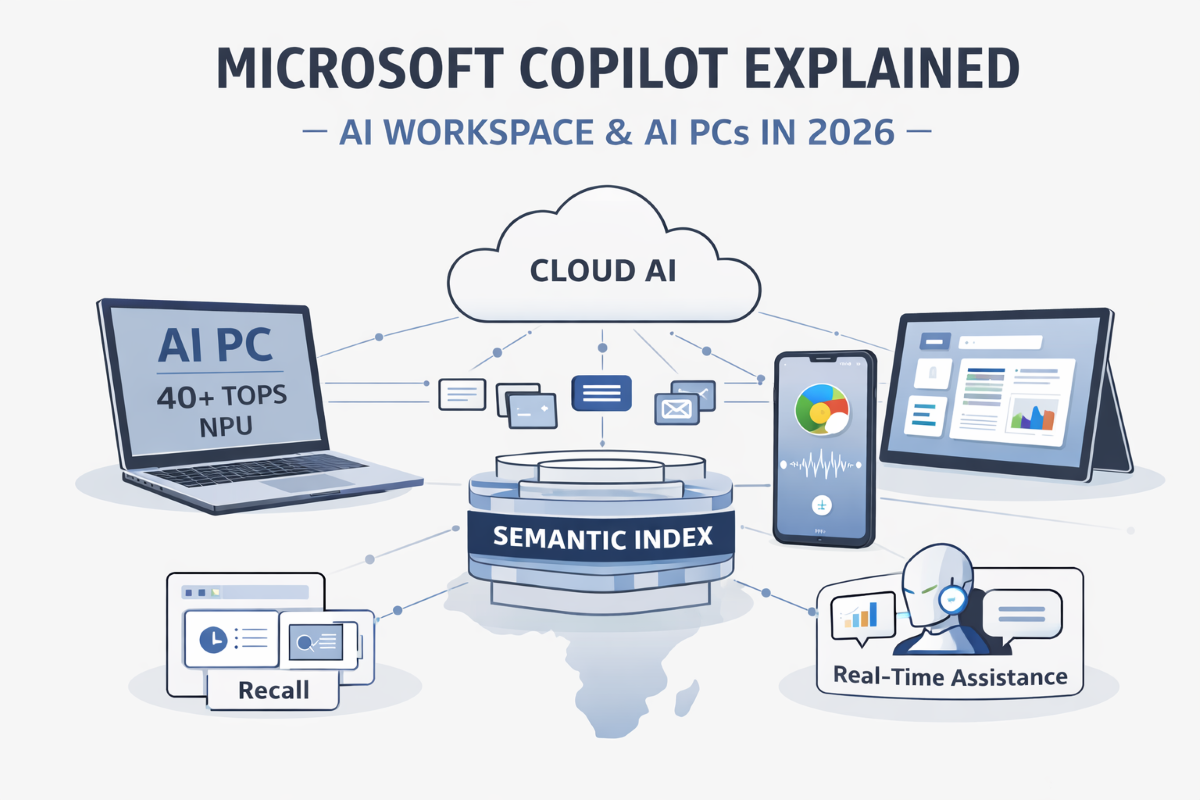
To understand why Copilot feels different from earlier digital assistants, it helps to examine the system’s architecture.
Microsoft designed Copilot as a hybrid AI platform that distributes intelligence across local hardware and cloud infrastructure.
| Architectural Layer | Function | Example |
| Local AI Processing | Runs small AI models on the device | Voice commands, image analysis |
| Cloud Intelligence | Runs powerful large language models | Complex reasoning and generation |
| Semantic Data Layer | Connects user data across apps | Context-aware search |
This architecture allows Copilot to balance three critical factors:
Speed – local AI processing ensures fast responses
Power – cloud models handle complex tasks
Privacy – sensitive data can remain on the device
For regions where internet connectivity can be inconsistent or data costs remain high, this hybrid design is particularly valuable.
It ensures that AI remains functional even when cloud access is limited.
The 40 TOPS Standard: Defining the AI PC
One of the most significant developments shaping the Copilot ecosystem is the emergence of the AI PC category.
Microsoft introduced the Copilot+ PC standard, establishing a hardware baseline for devices capable of running advanced AI features locally.
At the center of this requirement is the Neural Processing Unit (NPU).
An NPU is a specialized processor designed specifically for artificial intelligence tasks such as:
- speech recognition
- natural language processing
- image recognition
- machine learning inference
Unlike CPUs and GPUs, NPUs are optimized for parallel mathematical operations used by AI models. This allows them to perform AI calculations far more efficiently while consuming less power.
To qualify as a Copilot+ PC, a device must include an NPU capable of delivering at least 40 trillion operations per second (40 TOPS).
Devices below this threshold may still run AI tools, but will struggle to support advanced Copilot features such as:
- Copilot Recall timeline
• Live translation and captions
• Real-time AI assistance across apps
• Continuous background AI workflows
AI Processors Leading the Copilot Era
Several modern processors now meet the Copilot+ PC performance requirements.
| Processor | Manufacturer | Approximate AI Performance |
| Snapdragon X Elite Extreme | Qualcomm | 45+ TOPS |
| Intel Core Ultra Series 2 (Lunar Lake) | Intel | 40+ TOPS |
| AMD Ryzen AI 300 Series | AMD | 50+ TOPS |
These chips represent a major shift toward AI-native computing hardware, where dedicated neural engines work alongside traditional CPU and GPU cores.
The result is a new generation of computers designed specifically for AI-assisted productivity.
RAM Reality: Why 16GB Is the New Baseline
Memory capacity is becoming increasingly important in the era of AI computing.
For many years, 8GB RAM was considered sufficient for mainstream computing. Even professionals could operate comfortably within 16GB environments.
However, AI-driven workflows dramatically change memory requirements.
Modern computing environments now run several layers simultaneously:
- Traditional productivity applications
• AI indexing systems running in the background
• Local small language models assisting with tasks
Because of this, 16GB RAM is rapidly becoming the new baseline for AI-ready devices.
Recommended RAM for AI Workloads
| RAM | Ideal Usage |
| 8GB | Legacy computing |
| 16GB | Standard AI productivity |
| 32GB | Professional multitasking |
| 64GB+ | Developers and AI experimentation |
Devices with insufficient RAM may experience performance slowdowns when running AI workloads alongside traditional applications.
The Semantic Index: Your Digital Memory
One of the most powerful components of the Copilot ecosystem is the Semantic Index.
Traditional search systems rely heavily on keywords. When searching for a document, the system scans file names and content looking for exact matches.
Copilot’s Semantic Index works very differently.
Instead of simply matching keywords, it builds a relationship-based understanding of your digital environment.
Using the Microsoft Graph, Copilot analyzes connections between:
- emails
- calendar events
- documents
- chat conversations
- meeting transcripts
- cloud storage files
From this data, Copilot builds a dynamic knowledge map linking projects, people, and activities.
Traditional Search vs Semantic Search
| Feature | Traditional Search | Copilot Semantic Index |
| Keyword dependency | High | Low |
| Context awareness | Limited | Advanced |
| Relationship mapping | None | Extensive |
| Accuracy | Moderate | High |
The Semantic Index effectively turns your digital history into a searchable knowledge base.
Copilot Recall: Searching Your Workflow History
One feature demonstrating the power of the Semantic Index is Copilot Recall.
Recall captures snapshots of your workflow activity, allowing users to search their past work visually.
For example, a user could ask:
“Show me the spreadsheet I worked on yesterday afternoon.”
Copilot identifies the relevant moment in the timeline and retrieves the file instantly.
Instead of remembering file names, users can remember events or actions.
Copilot on Smartphones and Tablets
Copilot is not limited to PCs.
Microsoft has extended its AI ecosystem to smartphones and tablets, ensuring AI assistance follows users wherever they go.
The goal is to ensure your smartphone becomes a continuation of your AI workspace.
Dynamic Action Button
Many modern smartphones now include customizable hardware buttons known as Dynamic Action Buttons.
These can be configured to launch Copilot instantly for tasks such as:
- voice transcription
• quick summaries
• instant translations
• message drafting
This reduces the friction between intention and execution, making AI assistance instantly accessible.
Zero-Latency Voice Processing
Modern flagship smartphones feature powerful NPUs that can run AI models locally.
Processors such as:
- Snapdragon 8 Gen 5
- Apple A18 Pro
- MediaTek Dimensity 9400
allow voice commands to be processed directly on the device.
This enables near-instant responses without relying on cloud servers, which is particularly beneficial in regions with fluctuating connectivity.
Cross-Device Continuity
One of Copilot’s most powerful capabilities is its ability to maintain workflow context across devices.
Using services such as:
- Microsoft Phone Link
- OneDrive
- Microsoft 365
- Copilot agents
Users can seamlessly transition between devices.
Example Workflow
- A report begins on a laptop.
- Copilot summarizes key points.
- The user opens the document on a smartphone while traveling.
- Copilot continues suggesting edits.
No manual file transfers are required.
The AI maintains context and continuity across devices.
Privacy and Data Protection
As AI systems interact with personal and corporate data, security becomes critical.
Microsoft has implemented several safeguards.
Commercial Data Protection
Organizations using Microsoft Entra ID benefit from strong data isolation. Corporate data processed through Copilot is not used to train global AI models.
Stateless Processing
Microsoft also uses stateless cloud processing.
In this model:
- Data is processed in a secure environment
- The AI generates a response
- Data is deleted immediately after processing
This prevents long-term storage of sensitive information.
Why Copilot Matters for African Professionals
AI assistants are rapidly transforming productivity worldwide.
For professionals across Africa, tools like Copilot can significantly improve efficiency by helping users:
- automate repetitive tasks
• generate reports faster
• translate content across languages
• analyze large volumes of information
For entrepreneurs, journalists, consultants, and educators, AI assistants act as force multipliers, allowing individuals and small teams to achieve far more with fewer resources.
JuaTech Africa Verdict: AI Device Buyer Checklist
If you are planning to purchase a device designed for the Copilot ecosystem, consider the following specifications.
| Requirement | Recommended Standard |
| NPU Performance | 40+ TOPS |
| RAM | Minimum 16GB |
| Storage | 512GB SSD |
| Connectivity | Wi-Fi 7 and 5G |
| Processor | Snapdragon X Elite / Intel Core Ultra / Ryzen AI |
Devices that fall below these standards may struggle to support future AI capabilities.
The Future of Computing
Microsoft Copilot represents far more than another AI assistant layered on top of existing software. It signals a deeper transformation in how modern computing systems are designed and how people interact with technology.
For decades, computers required users to adapt to rigid interfaces. People had to learn software menus, keyboard shortcuts, and structured workflows to accomplish even simple tasks. The emerging AI workspace reverses this relationship. Instead of humans adjusting to machines, machines are increasingly adapting to human language, behavior, and context.
In this new paradigm, computing becomes more conversational and intuitive. Devices begin to understand what users are doing, what they are working on, and what information might be needed next. AI agents operate quietly in the background, assisting with tasks such as organizing files, summarizing documents, drafting communication, and retrieving information without requiring explicit commands for every step.
At the same time, information flows far more seamlessly between platforms. Work started on a laptop can continue on a smartphone. Documents, conversations, and data remain connected through intelligent systems that understand context rather than simply storing files.
For professionals, entrepreneurs, and businesses across Africa, understanding this transformation will be essential. The productivity advantages created by AI-assisted workflows will increasingly shape how organizations compete, collaborate, and innovate in the digital economy.
The next generation of computing will not be defined solely by faster processors or more powerful devices. Instead, it will be defined by intelligence embedded throughout the digital experience. Artificial intelligence will increasingly sit at the center of how people interact with technology, acting as the interface that connects users to applications, information, and services.
Within this evolving landscape, Microsoft Copilot is positioning itself as one of the platforms shaping the architecture of the modern AI workspace. As AI capabilities continue to mature, systems like Copilot may ultimately redefine not only how we use computers, but how we think about productivity, knowledge, and digital collaboration itself.
Frequently Asked Questions About Microsoft Copilot
- What is Microsoft Copilot?
Microsoft Copilot is an artificial intelligence assistant integrated into Microsoft products, including Windows, Microsoft 365, Edge, and mobile applications. It uses advanced large language models and contextual data from Microsoft Graph to help users perform tasks via natural-language instructions.
Instead of manually navigating software menus or searching through multiple applications, users can ask Copilot to summarize documents, draft emails, generate reports, analyze data, or retrieve information across their files and communication platforms.
In modern Windows systems, Copilot acts as a system-level assistant, meaning it can interact with different applications, automate tasks, and provide contextual support based on what a user is currently working on.
This shift represents a broader move toward AI-assisted computing, where software increasingly responds to human language rather than traditional commands.
- How does Microsoft Copilot work?
Microsoft Copilot works by combining several layers of artificial intelligence and data infrastructure.
At its core are large language models (LLMs) hosted on Microsoft Azure. These models understand natural language prompts and generate responses, summaries, or content.
Copilot is also connected to Microsoft Graph, which provides contextual data from a user’s digital environment, including emails, calendar events, files, and conversations. This allows Copilot to generate responses that are relevant to a user’s work and workflow.
On modern AI PCs, Copilot also leverages local AI models running on Neural Processing Units (NPUs). These enable tasks such as voice processing, image recognition, and real-time captioning to run directly on the device, without relying entirely on cloud computing.
The combination of cloud intelligence, local AI processing, and contextual data allows Copilot to function as a productivity assistant rather than a simple chatbot.
- What is the difference between Microsoft Copilot and ChatGPT?
Microsoft Copilot and ChatGPT are both powered by similar large language model technology, but they serve different roles.
ChatGPT is primarily a general-purpose conversational AI platform designed for knowledge queries, creative writing, coding assistance, and research.
Microsoft Copilot, on the other hand, is designed as a productivity assistant integrated into software ecosystems.
For example, Copilot can:
- summarize a meeting inside Microsoft Teams
- analyze data within Excel
- generate slides in PowerPoint
- retrieve documents from OneDrive or SharePoint
Because it is integrated directly into Microsoft applications and operating systems, Copilot has access to workflow context, which allows it to assist with tasks more effectively than a standalone chatbot.
- What is an AI PC, and why does Copilot need one?
An AI PC is a new category of computer designed specifically to run artificial intelligence workloads efficiently.
These systems include a specialized chip called a Neural Processing Unit (NPU) that accelerates AI calculations such as speech recognition, image processing, and language model inference.
Microsoft defines the modern AI PC standard through its Copilot+ PC initiative, which requires a device to deliver at least 40 trillion operations per second (40 TOPS) of AI processing performance.
With this hardware capability, AI tasks such as voice transcription, live translation, and real-time image analysis can run directly on the device rather than rely entirely on cloud servers.
This approach improves performance, reduces latency, and enhances privacy by offloading some data processing to local devices.
- Can Microsoft Copilot work without internet access?
Some Copilot features can operate without internet connectivity, but many advanced capabilities still require cloud access.
Tasks that may work locally include:
- voice recognition
- image analysis
- real-time captions
- basic AI assistance powered by small language models
However, complex tasks such as generating long documents, performing deep analysis, or retrieving information from cloud services typically require internet connectivity because they rely on large AI models hosted in Microsoft’s Azure infrastructure.
As AI PCs continue to evolve, more AI features are expected to run locally, reducing reliance on cloud computing.
- What is Copilot Recall, and how does it work?
Copilot Recall is a feature designed to help users retrieve information from their device’s past activity.
It works by capturing snapshots of what appears on a user’s screen over time. AI then indexes these snapshots so users can search for past content by context rather than file names.
For example, instead of remembering where a document was saved, a user could ask Copilot to show the spreadsheet they worked on during a meeting yesterday afternoon.
Recall uses AI to analyze images of previous screens and identify elements such as text, applications, and documents. The feature then organizes this information into a searchable timeline.
Microsoft has also introduced privacy controls allowing users to pause or restrict what Recall records.
- Is Microsoft Copilot safe for business and enterprise use?
Microsoft has implemented several security measures to make Copilot suitable for enterprise environments.
For organizations using Microsoft Entra ID, Copilot operates under commercial data protection policies. This means that company data processed through Copilot is not used to train global AI models.
Additionally, many Copilot processes use stateless cloud processing, in which data is temporarily processed to generate a response and then deleted.
These safeguards are designed to ensure that sensitive corporate data remains secure while organizations benefit from AI-powered productivity tools.
- What can Microsoft Copilot actually do in everyday work?
In practical terms, Microsoft Copilot can assist with a wide range of daily productivity tasks.
Examples include:
- summarizing long email threads
- generating reports from Excel data
- drafting presentations from written outlines
- summarizing meetings in Microsoft Teams
- writing or editing documents in Word
- analyzing datasets to identify trends
For professionals who manage large volumes of information, Copilot can dramatically reduce the time required to process and organize data.
This allows users to focus more on decision-making and creative work rather than administrative tasks.
- Do you need Microsoft 365 to use Copilot?
Microsoft Copilot exists in several different forms. Some Copilot features are integrated directly into Windows and Microsoft Edge and can be used without a Microsoft 365 subscription.
However, Copilot’s full productivity capabilities are available in Microsoft 365 applications, including Word, Excel, PowerPoint, Outlook, and Teams.
Organizations or individuals who subscribe to Microsoft 365 Copilot gain access to AI features designed specifically for business workflows and collaboration.
- Why is Microsoft Copilot important for the future of computing?
Microsoft Copilot represents a major shift in how people interact with computers.
Traditional computing relies on users manually navigating software interfaces to complete tasks. AI assistants like Copilot introduce a new interaction model that lets users describe what they want to achieve in natural language.
As AI becomes integrated across operating systems, applications, and devices, computers will increasingly act as intelligent collaborators rather than passive tools.
This transformation could significantly improve productivity, reduce technical barriers, and enable more people to access advanced computing capabilities through simple conversational interfaces.
For professionals, businesses, and digital creators across Africa, understanding how tools like Copilot work will be an important step toward navigating the next generation of technology.