



Every interaction you have with your smartphone leaves a permanent footprint. Every photo you capture, every app you install, every video you record, and every document you download must be written to a location your device can access later. That place is storage.
Storage is not simply a specification on a product sheet. It is the permanent memory foundation of your device. It is responsible for preserving your data, maintaining your operating system, and ensuring your device remains usable, stable, and reliable throughout its lifespan.

Without storage, your device would not remember your apps, settings, files, or even its operating system. Every restart would return it to an empty, unusable state. Storage is what transforms hardware into a persistent, dependable personal device.
Yet storage is often misunderstood. Many users focus only on storage capacity while overlooking storage speed, technology type, and long-term implications. These factors directly influence device performance, responsiveness, and longevity.
Understanding storage is essential to understanding how your device truly works. It allows you to interpret specifications accurately, evaluate devices intelligently, and choose technology that will serve you reliably over time.
This guide provides a complete, practical, and technically grounded explanation of storage in smartphones, tablets, and smart devices.
What Storage Is and Why It Exists
Storage is the permanent memory inside your device that retains data even when power is turned off. It is built with specialized electronic memory chips designed to preserve information over long periods reliably.
Storage holds everything necessary for your device to function and serve your needs, including:
- The operating system that powers the device
- Installed applications and their associated data
- Photos, videos, and personal media
- Downloaded files and documents
- System settings and configuration data
- Cached and temporary system information
This permanent retention capability enables your device to function consistently from day to day.
When you power on your device, the operating system loads from storage into working memory. When you install apps, they are written into storage. When you capture photos or record videos, they are stored.
Storage serves as the foundation of your device.
How Storage Works at the System Level
Modern smartphones, tablets, and other smart devices use non-volatile flash storage. Non-volatile means the memory retains information even when power is removed.
When you perform any action that involves saving or installing data, the device writes that information into flash storage cells.
For example, when you install an app:
- The app installer downloads the application package.
- The system writes the application files into storage.
- The operating system registers the app as installed.
- The app remains stored permanently until you remove it.
When you open the app later, the system retrieves the necessary data from storage and loads it into RAM so that the processor can execute it efficiently.
Storage acts as the permanent archive, while RAM acts as the temporary workspace.
This coordinated relationship ensures both persistence and performance.
Storage and RAM: Understanding Their Complementary Roles
Storage and RAM work together, but they serve fundamentally different purposes.
Storage (ROM) provides permanent data retention. RAM provides temporary working memory for active processes.
Storage ensures your device remembers information long-term. RAM ensures your device operates smoothly in real time.
Consider this practical example:
Your phone permanently stores Instagram data. When you open Instagram, the system loads its active components into RAM. The processor then executes instructions using data from RAM.
Storage provides persistence. RAM provides immediacy.
Both are essential, but their roles are distinct.
Why Storage Speed Is Critical to Device Performance
Storage speed directly influences how quickly your device can access and retrieve data. Faster storage improves responsiveness across the entire system.
When storage is fast:
- Apps open quickly
- Files load instantly
- System operations feel smooth
- Camera processing completes faster
- System updates install efficiently
When storage is slow, even powerful processors and sufficient RAM cannot compensate fully. The system must wait for data to be retrieved from storage before executing tasks.
Storage speed is therefore a fundamental component of overall device performance.
Understanding Storage Technologies: eMMC vs UFS
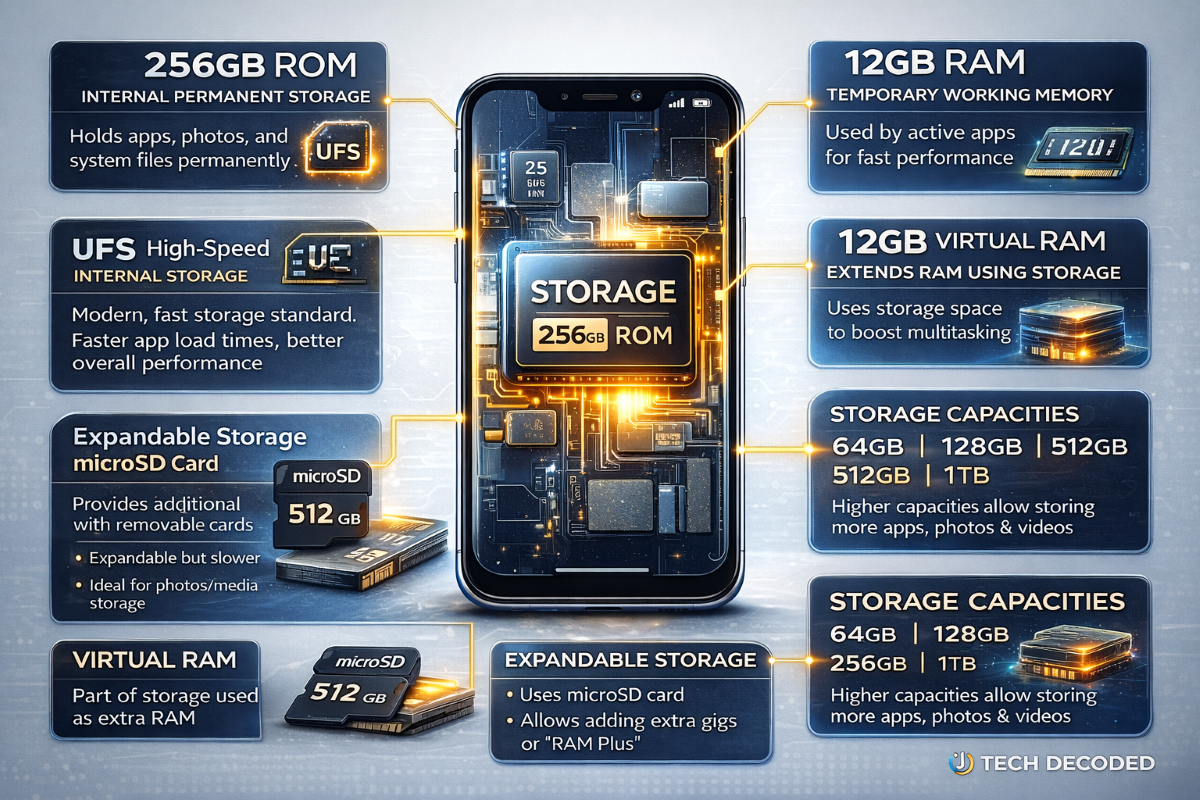
Not all storage technologies are equal. The two primary storage technologies used in smartphones are eMMC and UFS.
eMMC: Legacy Storage Technology
eMMC, or Embedded MultiMediaCard, is an older storage standard commonly used in entry-level and budget devices.
While functional, eMMC offers lower speeds than modern storage technologies. Data transfer rates are slower, leading to longer app load times and reduced system responsiveness.
Devices using eMMC storage are suitable for basic tasks but may struggle with demanding workloads.
UFS: Modern High-Performance Storage
UFS, or Universal Flash Storage, is the modern storage standard used in contemporary smartphones and tablets.
UFS offers significantly faster data transfer speeds, improved efficiency, and enhanced system responsiveness.
Common UFS versions include:
- UFS 2.1
- UFS 2.2
- UFS 3.1
- UFS 4.0
Each newer generation improves performance and efficiency.
UFS enables faster app launches, smoother multitasking, and improved camera performance.
It is essential for delivering modern smartphone performance.
How Storage Speed Influences Real-World Experience
The impact of storage speed becomes evident in everyday use.
Devices with faster storage can:
- Open large apps instantly
- Process high-resolution photos efficiently.
- Handle large video recordings smoothly.
- Install system updates quickly.
- Load games faster
These improvements translate directly into a better user experience.
Storage speed determines how responsive your device feels in daily use.
Storage Capacity and What It Means for Your Usage
Storage capacity determines how much data your device can hold.
Common capacities include:
- 64GB
- 128GB
- 256GB
- 512GB
- 1TB
Higher capacities allow storing more apps, media, and files without running out of space.
Modern apps, photos, and videos require increasing storage capacity. High-resolution cameras and advanced applications consume more storage than ever before.
Choosing sufficient storage capacity ensures long-term usability and prevents limitations.
Expandable Storage and microSD Cards
Some devices support expandable storage using microSD cards. These removable memory cards allow users to increase storage capacity.
microSD cards are useful for storing photos, videos, and files. However, they are generally slower than internal storage.
Internal storage remains the preferred location for apps and system operations.
Expandable storage provides flexibility, but internal storage provides optimal performance.
Internal Storage vs External Storage
Internal storage is integrated directly into the device. It provides faster speeds, better reliability, and optimal system performance.
External storage, such as microSD cards or external drives, provides additional capacity but lower performance.
Internal storage is always used for system operations. External storage serves as supplemental capacity.
Storage and Software Updates
Software updates require available storage space to install properly. Devices with insufficient storage may fail to install updates.
Updates improve security, performance, and system stability.
Adequate storage ensures your device remains secure and functional over time.
Storage availability directly affects device maintenance and reliability.
Storage and Long-Term Device Longevity
Storage capacity and speed influence how well your device performs over its lifespan.
Devices with insufficient storage fill up quickly. Limited storage restricts usability and prevents installing updates.
Faster storage ensures consistent performance.
Choosing sufficient and fast storage improves long-term device reliability.
Storage in Tablets, Smartwatches, and Other Smart Devices
Storage is a foundational component across all smart devices because it enables them to retain the operating system, applications, user data, and system information required for reliable operation. While smartphones are the most widely used smart devices, tablets, smartwatches, and other connected devices rely just as heavily on storage to deliver their intended functionality. Storage enables these devices to preserve information permanently, operate independently, and provide a consistent user experience over time.
In tablets, storage plays a central role in supporting productivity, education, and entertainment. Tablets are often used to store documents, presentations, learning materials, videos, creative files, and professional applications. Students rely on storage to retain textbooks, assignments, and downloaded learning content. Professionals use storage to preserve business files, presentations, and productivity tools. Creative users depend on storage to save drawings, edited photos, and video projects. As tablet displays grow larger and more capable, they encourage richer content creation and consumption, thereby increasing storage demands. Sufficient storage ensures tablets remain capable, responsive, and useful across both personal and professional environments.
In smartwatches, storage serves a different but equally important purpose. Smartwatches use storage to retain the operating system, installed apps, health monitoring data, and offline media. Health and fitness tracking features continuously record information such as heart rate, sleep patterns, activity levels, and workout history. This data is stored locally on the device and synchronized with companion smartphones or cloud services when the device is connected. Storage also enables features such as offline music playback, allowing users to listen to music directly from the watch without needing a phone nearby. Without adequate storage, these features would be limited or unavailable, reducing the watch’s independence and usefulness.
Other smart devices, including wireless earbuds, smart TVs, and smart home systems, also depend on storage to function effectively. Smart TVs use storage to run operating systems, install streaming apps, and cache media content for smoother playback. Wireless earbuds with onboard storage can store audio files for direct playback. Smart home devices use storage to retain configuration settings, automation routines, and system updates. In each case, storage enables these devices to operate reliably, retain essential data, and deliver consistent performance.
Storage capacity and speed influence how effectively these devices perform their roles. Adequate storage ensures users can install necessary apps, retain important data, and receive system updates without limitations. Faster storage improves responsiveness, reduces loading times, and enhances overall efficiency. As smart devices become more capable and handle increasingly complex tasks, storage continues to play a critical role in ensuring they remain functional, reliable, and able to support modern digital lifestyles.
Storage as a Foundational Component of Modern Computing
Storage is more than a passive specification. It is an active, foundational component that directly affects performance, reliability, and usability.
It preserves your data, supports your operating system, and enables your device to function consistently over time.
Understanding storage allows you to evaluate devices accurately, avoid limitations, and choose technology that will serve you reliably.
Storage determines not only how much your device can store, but also how effectively it operates throughout its lifespan.
For any smartphone, tablet, or smart device, storage remains one of the most critical determinants of capability, stability, and long-term usability.
Frequently Asked Questions: Storage Explained
1. What is storage in a smartphone, and what role does it play?
Storage is the permanent memory inside your smartphone that preserves all essential data required for the device to function and serve your needs. This includes the operating system, installed apps, photos, videos, documents, and system configuration files. Unlike temporary memory, storage retains information even when the device is powered off, ensuring continuity and stability.
Without storage, your smartphone would not remember installed apps, saved files, or system settings. Every restart would return the device to its original factory condition. Storage transforms hardware into a reliable personal computing device by preserving your digital environment consistently over time.
2. How is storage different from RAM, and why are both necessary?
Storage and RAM serve distinct but complementary functions within your device’s architecture. Storage provides permanent data retention, preserving apps, files, and system components for the long term. RAM, on the other hand, provides temporary working memory that allows the processor to access and execute active tasks quickly.
When you install an app, it is written into storage. When you open the app, the system loads its active components from storage into RAM so that the processor can execute instructions efficiently. Storage ensures persistence, while RAM ensures responsiveness. Both are essential, but storage determines capacity and longevity, while RAM determines real-time operational efficiency.
3. Does storage affect smartphone performance and overall speed?
Storage directly affects how responsive and efficient your smartphone feels during everyday use. Faster storage allows apps to open quickly, files to load instantly, and system operations to execute without delay. Slower storage creates bottlenecks, forcing the processor to wait for data retrieval before performing tasks.
Even with a powerful processor and sufficient RAM, slow storage can significantly limit performance. Storage speed determines how efficiently the entire system operates, making it a critical factor in real-world usability.
4. What is UFS storage, and why is it important in modern devices?
Universal Flash Storage, or UFS, is the modern storage standard used in smartphones, tablets, and other smart devices. It offers significantly faster read and write speeds compared to older technologies, enabling faster data access and improved system efficiency.
UFS storage enhances overall device responsiveness by reducing app loading times, accelerating file transfers, improving camera processing speeds, and ensuring smooth multitasking. Modern versions such as UFS 3.1 and UFS 4.0 provide the high-speed performance required for advanced applications, gaming, and high-resolution video recording. UFS is essential for delivering the performance expected from modern smartphones.
5. What is eMMC storage, and how does it compare to UFS storage?
Embedded MultiMediaCard (eMMC) is an older storage technology commonly used in entry-level and budget devices. While functional, eMMC offers significantly slower data transfer speeds compared to UFS.
Devices using eMMC storage may take longer to open apps, install updates, and process files. This results in reduced responsiveness and slower overall performance. UFS storage represents a major advancement in speed and efficiency, making it the preferred standard for modern devices.
6. How much storage capacity is sufficient for modern smartphone users?
Storage requirements vary depending on usage patterns, but modern users generally require more storage than in previous years. Basic users may get by with 64GB, but this capacity fills up quickly due to the size of modern apps and media files.
For most users, 128GB is a practical minimum, providing enough space for apps, photos, videos, and system updates. Users who frequently record videos, install large applications, or store extensive media libraries should consider 256GB or higher. Choosing sufficient storage ensures long-term usability and prevents performance limitations caused by insufficient capacity.
7. Why does storage speed matter even when storage capacity is adequate?
Storage capacity determines how much data your device can hold, but storage speed determines how efficiently your device can access and use that data. Faster storage allows apps to launch quickly, files to load instantly, and system processes to execute smoothly.
Two devices with identical storage capacity can perform very differently depending on storage speed. Faster storage significantly improves responsiveness, making it a crucial factor in overall device performance.
8. What happens when smartphone storage becomes full?
When storage reaches full capacity, the device can no longer save new data, install apps, or receive system updates. This can cause performance degradation, app crashes, and system instability. The operating system requires available storage space to manage temporary files and system processes efficiently.
Maintaining available storage space ensures the device continues operating smoothly and reliably.
9. Can internal storage be upgraded after purchasing a smartphone?
In most modern smartphones, internal storage is permanently integrated into the device and cannot be upgraded. Storage chips are soldered directly onto the device’s motherboard, making replacement or expansion impractical.
Users must select an appropriate storage capacity at the time of purchase. Some devices support expandable storage through microSD cards, but internal storage itself remains fixed.
10. What is expandable storage, and how does it work?
Expandable storage allows users to increase capacity by using removable memory cards, such as microSD cards. These cards provide additional space for storing photos, videos, music, and documents.
While expandable storage increases capacity, it does not match the speed or reliability of internal storage. Internal storage remains the primary storage used for system operations and applications.
11. Is internal storage faster and more reliable than microSD storage?
Internal storage offers significantly higher performance and reliability compared to microSD storage. Internal storage uses advanced technologies such as UFS, which enable faster data transfer and lower latency.
microSD cards operate over slower external interfaces and are better suited for storing media files than for running apps or system processes.
12. What does storage capacity, such as 128GB or 256GB, represent in practical terms?
Storage capacity indicates the total amount of digital data your device can hold. Higher capacities allow storing more applications, media files, and system updates without reaching storage limits.
Larger storage capacity improves long-term usability by accommodating increasing storage demands over time.
13. Why is the available storage less than the advertised capacity?
A portion of storage capacity is reserved for the operating system and essential system files required for device operation. This reduces the amount of storage available for user data.
This reserved space ensures proper device functionality and system stability.
14. Does storage speed affect gaming performance?
Storage speed directly affects game loading times and overall gaming experience. Faster storage speeds up asset loading, reducing delays and improving responsiveness.
Modern games require fast storage to operate efficiently.
15. Does storage affect camera performance and video recording?
Storage speed influences how quickly photos and videos are saved. Faster storage enables faster image processing and smoother video recording, particularly for high-resolution, high-frame-rate video.
Slow storage can create delays and affect recording performance.
16. What is virtual RAM, and how does storage support it?
Virtual RAM uses a portion of internal storage to simulate additional memory capacity. This helps improve multitasking by allowing the device to handle more background processes.
However, storage is slower than physical RAM, making virtual RAM less effective than actual RAM.
17. Does storage affect software updates and long-term system stability?
Adequate storage is required to install system updates. Updates improve security, performance, and compatibility. Insufficient storage prevents updates, leaving devices vulnerable and reducing performance.
Storage availability is essential for long-term device reliability.
18. Why does storage usage increase over time?
Storage usage grows as apps receive updates, store additional data, and accumulate cached files. Media files, such as photos and videos, also consume storage over time.
Storage demands naturally increase as devices are used more.
19. Does storage technology affect battery efficiency?
Efficient storage reduces data retrieval time, lowering processor workload and improving overall energy efficiency. Faster storage technologies improve system efficiency and battery performance.
20. What is NAND flash storage, and why is it used?
NAND flash is the underlying memory technology used in smartphones. It enables permanent data storage with high reliability and efficiency. Modern storage technologies such as UFS are built using NAND flash.
21. Why do flagship smartphones use faster storage technologies?
Flagship smartphones use faster storage technologies because their advanced hardware and features depend on rapid data access to function at their full potential. These devices are designed to handle demanding workloads, including high-resolution photography, 4K and 8K video recording, real-time image processing, advanced gaming, artificial intelligence tasks, and seamless multitasking. All of these operations require the system to read and write large amounts of data quickly and efficiently.
Faster storage technologies such as UFS 3.1 and UFS 4.0 allow the processor, RAM, and graphics systems to access data without delay. This ensures apps open instantly, media files load smoothly, and the system remains responsive under heavy workloads. Without fast storage, even the most powerful processor and abundant RAM would be forced to wait for slower data retrieval, creating performance bottlenecks. Fast storage ensures the entire system operates in balance, delivering the speed, responsiveness, and reliability expected from premium flagship devices.
22. Does storage matter in tablets and smartwatches?
Storage is a fundamental component of tablets and smartwatches because it enables these devices to permanently store operating systems, applications, personal data, and system updates. In tablets, storage supports productivity tasks such as saving documents, downloading educational materials, storing media files, and running professional applications. Tablets are often used for multitasking, content creation, and media consumption, all of which require reliable storage capacity and performance.
In smartwatches, storage enables features such as offline music playback, app installation, health and fitness data tracking, and system functionality. Health metrics, workout records, and system data are continuously stored and preserved for future access. Storage capacity directly affects how much data these devices can retain and how effectively they can function without limitations. Reliable storage ensures tablets and smartwatches remain functional, responsive, and capable of delivering their intended features over time.
23. How does storage affect long-term smartphone usability?
Storage capacity and speed play a critical role in determining how usable and reliable a smartphone remains over its lifespan. Modern apps, operating systems, and media files continue to increase in size, requiring more storage space than older devices were designed to accommodate. As storage fills up, devices may experience slower performance, difficulty installing updates, and limitations in installing new apps or saving new data.
Adequate storage ensures the device can continue receiving system updates, installing new applications, and storing user data without performance degradation. Faster storage also ensures consistent responsiveness as software demands increase. Choosing appropriate, modern storage technology helps extend the device’s practical lifespan, ensuring it remains functional, secure, and responsive for years.
24. What storage type is best when buying a smartphone today?
The best storage technology available in modern smartphones is UFS, particularly UFS 3.1 and UFS 4.0. These storage standards offer significantly faster data transfer speeds, improved efficiency, and better overall performance compared to older technologies such as eMMC. UFS storage allows apps to launch quickly, improves system responsiveness, accelerates file transfers, and enhances camera and gaming performance.
UFS 4.0 represents the latest advancement, offering even faster speeds and improved energy efficiency compared to previous generations. This ensures devices remain capable of handling demanding applications and future software updates. Choosing a smartphone with UFS storage ensures optimal performance, reliability, and long-term usability. It provides the best balance between speed, efficiency, and future readiness.
25. Why is storage one of the most important smartphone specifications?
Storage is one of the most important smartphone specifications because it determines both how much data your device can store and how efficiently it operates. Storage directly affects app installation, file access speed, system updates, media storage, and overall responsiveness. It plays a central role in enabling the operating system, apps, and user data to function together reliably.
Unlike specifications such as camera resolution or display size, storage affects every aspect of device functionality continuously. Insufficient or slow storage can limit performance, restrict usability, and shorten the device’s useful lifespan. Fast and sufficient storage ensures smooth operation, reliable data preservation, and long-term usability. Understanding storage enables users to choose devices that remain capable, efficient, and dependable throughout their lifespans.